
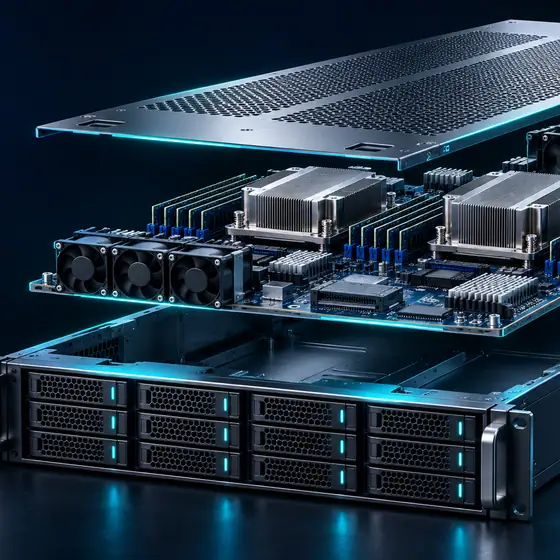
A bare metal server is a physical machine rented to one customer. You get every CPU core, all the memory and the raw disks, plus out-of-band console access to install and recover the operating system yourself. It fits steady heavy workloads, large databases and licensing tied to physical cores. If your load is small or changes week to week, a VPS or cloud instance is usually cheaper and easier.
What bare metal means in practice
"Bare metal" and "dedicated server" describe the same thing: a physical server in a supplier's data center that is assigned to you alone. Nothing else runs on it. There is no hypervisor slicing the CPU between tenants, no shared storage pool behind your disks, and no other customer's traffic on your network ports.
That has three practical consequences a buyer should weigh:
- Consistent performance. Every core, cache line and memory channel is yours. There is no "noisy neighbor" effect from other tenants, which matters for databases, build servers, game servers and anything with tight latency budgets.
- Direct hardware access. Local NVMe drives run at the speed of the drive, not the speed of a network block service. You can run your own hypervisor, containers, or a tuned kernel, and use CPU features that some virtual platforms hide.
- Slower to change. A physical machine cannot be resized in place. More RAM or more disks means a hardware change or a second server. Replacing a failed part means a technician at the rack. Plan for that up front instead of discovering it during an incident.
BroadNet Cloud does not own data centers. We specify, quote, provision and support servers that sit in established third-party facilities. The supplier, the facility region, the exact hardware and the terms are confirmed in your written quote. There is no self-serve checkout or customer portal yet.
Who bare metal is for, and who should skip it
A good fit
- Databases that need large RAM and fast local NVMe, running hot all month.
- CI and build servers, rendering and batch jobs that keep every core busy.
- Software licensed per physical core or socket, where virtual cores complicate the count.
- Teams that want to run their own hypervisor or Kubernetes nodes on hardware they control.
- Workloads where a policy asks for single-tenant hardware; see secure hosting for the controls around it.
Probably not a fit
- Small or spiky workloads: a VPS or cloud hosting lets you pay for what you use and resize quickly.
- Teams with nobody to patch an operating system: consider managed hosting.
- Projects that need capacity within minutes or for a few days only.
- One server and no plan for its failure: bare metal still fails. If it is critical, budget for a second machine or a tested restore.
What you can specify
The configurator collects these choices and the quote confirms each one by part, along with the supplier and region. Exact CPU models, drive models and port speeds depend on what the supplier can supply in that region at the time of the quote.
| Component | Options we quote | What to decide |
|---|---|---|
| CPU | Current AMD EPYC and Intel Xeon server classes; single or dual socket | Core count versus clock speed. Many cores suit parallel work; higher clocks suit single-threaded databases and game servers. |
| Memory | ECC registered DDR4 or DDR5, depending on platform | Size for the working set plus headroom. Populating every memory channel evenly keeps bandwidth up. |
| Fast storage | NVMe SSD (U.2, U.3 or M.2 depending on chassis) | Databases, VM images and build caches. Check drive endurance rating for write-heavy work. |
| Bulk storage | SATA SSD or SATA/SAS HDD | Archives, backups and media where cost per terabyte matters more than latency. |
| RAID | Hardware RAID controller or software RAID (mdadm, ZFS); RAID 1, 10, 5, 6 or none | Redundancy and rebuild time. See the RAID section below. |
| Network ports | 1, 10 or 25 GbE and higher where the supplier offers it; one or two public ports, optional private port | Port speed is not the same as included transfer. Both are written in the quote. |
| Transfer | Committed rate or monthly allowance, per supplier | Confirmed at quote |
| IP addresses | IPv4 allocation and IPv6 where available | How many addresses you need and why; larger IPv4 blocks often need written justification. |
| Out-of-band access | IPMI or Redfish-based BMC with remote console and virtual media | Who gets access and from which networks. |
| Operating system | Common Linux distributions, Windows Server (license terms in quote), or your own image | Who installs it and who patches it afterwards. |
CPU classes in plain terms
Both AMD EPYC and Intel Xeon server lines come in families tuned for different jobs. High-core-count parts suit virtualization hosts, build farms and container nodes. Lower-core, higher-frequency parts suit licensed databases and latency-sensitive services, and they can cut per-core license cost. Dual-socket servers double cores and memory slots but add a second NUMA node, which software that is not NUMA-aware handles poorly. The exact model is named in the quote.
Out-of-band access (IPMI and Redfish)
The baseboard management controller (BMC) is a small computer on the motherboard that stays reachable even when the operating system is down. Through it you can power-cycle the server, watch the boot screen over a remote console, mount an ISO as virtual media and read hardware sensors. Older BMCs speak IPMI; newer ones also implement the DMTF Redfish REST API. Because a BMC can reinstall the whole machine, its access is restricted: the quote states how it is reached (normally through a VPN or an allow-listed address), and we recommend you never expose it to the open internet.
Choosing a RAID layout
RAID protects against a drive failing. It does not protect against deletion, ransomware, a bad deploy or the whole server failing, so it never replaces backups.
| Level | Usable capacity | Survives | Good for |
|---|---|---|---|
| RAID 1 | One drive's worth (of two) | One drive failure | Operating system mirror, small databases |
| RAID 10 | Half of total | One drive per mirror pair | Write-heavy databases on NVMe or SSD |
| RAID 5 | Total minus one drive | One drive failure | Read-mostly data on small drive counts; risky on large HDDs because rebuilds are long |
| RAID 6 | Total minus two drives | Two drive failures | Bulk HDD storage and backup targets |
| None (JBOD) | All | Nothing | Software that replicates itself, such as distributed storage or replicated databases |
Worked example
Six 8 TB HDDs. RAID 6 gives (6 - 2) x 8 = 32 TB usable and survives two failures. RAID 10 gives 6 / 2 x 8 = 24 TB usable, with faster writes and faster rebuilds, but a second failure in the same mirror pair loses data. For a backup target, RAID 6 is usually the better trade. For a busy database, RAID 10 on SSD or NVMe is.
Hardware RAID offloads parity work and presents one logical volume, which simplifies booting. Software RAID (mdadm or ZFS) avoids dependence on one controller, and ZFS checksums every block. On NVMe, software RAID is often preferred because a hardware controller can become the bottleneck. The quote notes the choice and any controller model.
Reference configurations
These are starting shapes, not packages. Each one is adjusted to your workload and priced in the written quote once the supplier confirms the parts.
| Shape | CPU class | Memory | Storage | Network | Price |
|---|---|---|---|---|---|
| Compact database | Single socket, high frequency | 128 GB ECC | 2 x NVMe in RAID 1 | 1 or 10 GbE | Price shown at quote |
| Build and CI node | Single socket, high core count | 256 GB ECC | 2 x NVMe RAID 1 plus scratch NVMe | 10 GbE | Price shown at quote |
| Virtualization host | Dual socket, high core count | 512 GB to 1 TB ECC | 4 x NVMe in RAID 10 | 2 x 10 or 25 GbE | Price shown at quote |
| Storage and backup | Single socket, moderate cores | 64 to 128 GB ECC | 2 x SSD (OS) plus 8 to 12 x HDD in RAID 6 or ZFS RAIDZ2 | 10 GbE | Price shown at quote |
For GPU servers, see AI and GPU hosting; they are specified differently because GPU memory and interconnect drive the choice.
Use cases and why bare metal fits them
Primary database server
PostgreSQL, MySQL and similar engines are sensitive to storage latency and memory size. Local NVMe in RAID 10 avoids the network hop of cloud block storage, and a working set that fits in RAM avoids disk reads altogether. The trade-off is that failover is yours to build: pair the server with a replica or a tested restore plan from the backup and recovery guide.
Build farms and batch processing
Compilers, test suites and media encoding keep every core busy for hours, often the costliest pattern on virtual platforms. A fixed-cost high-core server makes it a known line item. Run the 3-year TCO calculator with your real hours to check the break-even.
Your own private cloud
Proxmox VE, VMware, KVM or Kubernetes on two or three bare metal hosts gives you full control over placement, overcommit and storage. You also own hypervisor patching and cluster design.
Per-core licensed software
Some commercial databases and enterprise applications count physical cores or sockets. On a dedicated server the count is unambiguous, and you can choose a lower-core, higher-clock CPU to reduce license spend. Check the vendor's own licensing terms before you buy.
Bare metal compared with VPS and cloud
| Factor | Bare metal | VPS | Cloud instances |
|---|---|---|---|
| Tenancy | Single tenant | Shared host, isolated VM | Shared host, isolated VM (dedicated hosts sometimes available) |
| Performance consistency | Highest; no neighbors | Depends on host contention and CPU type | Depends on instance family |
| Storage | Local disks at full device speed | Local or pooled virtual disks | Mostly network block storage |
| Resize | Hardware change or new server | Plan change, usually with a reboot | Resize or add instances |
| Hardware failure | Technician replaces the part; downtime unless you run a second server | Supplier moves or restarts the VM | Supplier restarts; designs often span several instances |
| Console | BMC (IPMI or Redfish) | Supplier's virtual console | Supplier's virtual console |
| Cost shape | Fixed monthly or term | Fixed monthly | Metered by component |
| Best for | Steady heavy load, large RAM, local NVMe | One steady small or medium server | Multi-machine and changing workloads |
Not sure which applies? The server finder asks a few questions about your workload, and the hosting type guide explains the reasoning in more depth.
Who is responsible for what
Bare metal is unmanaged by default: you have root and you own everything above the hardware. Managed options can be added and, if they are, the quote lists them line by line.
| Area | BroadNet Cloud | Supplier | You |
|---|---|---|---|
| Facility, power, cooling, physical security | - | Responsible | - |
| Hardware and part replacement | Raises and tracks the case | Responsible | Reports faults |
| Network up to your port | - | Responsible | - |
| Quote accuracy and account | Responsible | - | - |
| Initial OS install | Confirmed at quote | - | Confirmed at quote |
| OS patching, firewall, users, apps | Only if managed is bought | - | Responsible |
| Data and backups | Only if backup is bought | - | Responsible |
| BMC credentials | Issues access | - | Keeps them safe |
The full split across every product is on security and reliability, and the Linux hardening guide is a good first-day checklist.
What happens when hardware fails
Drives, power supplies, memory and fans fail on every platform; what matters is a path written down in advance. Supplier terms are confirmed in your quote. The process:
- Detect. You see an alert from your monitoring, a degraded RAID array or a BMC sensor warning, and report it to us with the server identifier.
- Diagnose. We check BMC logs and, where possible, identify the failed part and the drive slot before anyone touches the server.
- Schedule. Hot-swappable parts (most drives and redundant power supplies) can often be replaced without a shutdown. Memory, CPU and motherboard work needs downtime; we agree a window with you.
- Replace. The supplier's technician swaps the part. You rebuild the RAID array or confirm the controller has done so.
- Close. We confirm the outcome with you in writing and note it against the server record.
Ask what happens to a failed drive. Disks that held your data should be wiped or destroyed by a documented method, such as those in NIST SP 800-88. Whether the supplier returns, wipes or shreds failed media is part of the quote, and it matters if you store sensitive data.
Support and contract terms the quote fixes in writing
We do not publish general service levels for bare metal yet, because they depend on supplier contracts that are not final. Instead, every quote states:
- The supplier, facility region and the exact hardware model list.
- The term (monthly or a fixed term), the renewal rule and the notice period to cancel.
- Support channels and hours, and what is in scope: hardware cases, network faults, BMC access, OS help if bought.
- The hardware replacement path and any stated targets the supplier commits to.
- Included transfer, IP addresses and what overage costs.
- Media handling for failed and returned drives.
- How you get your data off at the end, and when the server is wiped.
The general support policy is on the support page.
How buying a bare metal server works
- Describe the workload. Use the configurator on pricing or the quote form. Tell us what runs on the machine, current resource use if you have it, and where your users are.
- Review the proposal. We suggest a CPU class, memory, disk layout and network, and explain the trade-offs.
- Get the written quote. It names the supplier, region, parts, price, term and support scope.
- Accept and provision. The supplier builds or allocates the server. We hand over IP details, BMC access and, if agreed, the installed OS.
- Verify. Check the hardware against the quote with
lscpuandlsblk.
Frequently asked questions
Is bare metal the same as a dedicated server?
Yes. Both mean a physical server assigned to one customer. "Bare metal" is the newer term and often implies you can install anything, including your own hypervisor.
Can I upgrade RAM or add disks later?
Usually, if the chassis has free slots and the supplier stocks compatible parts. It needs a maintenance window and a quote amendment. If you expect fast growth, ask for spare slots in the first quote.
Do I get IPMI access?
Out-of-band console access is part of the bare metal specification. How it is reached (VPN, allow-listed addresses) and whether it is IPMI or Redfish depends on the server and is stated in the quote.
Can I install my own operating system or hypervisor?
Yes. You can boot your own ISO over the BMC virtual media and install any OS the hardware supports, including Proxmox VE, VMware ESXi or a custom Linux image. Licenses for commercial software are your responsibility unless the quote includes them.
Is RAID a backup?
No. RAID keeps the server running when a drive fails. It does nothing against deletion, ransomware or loss of the whole server. Keep copies elsewhere and test restores.
How long is the contract?
Monthly and fixed-term options are both possible. The term, renewal and notice period are written in the quote before you sign.
Can you show me the price now?
Not on the website. Hardware cost depends on the exact parts, the supplier and the region, so the price is shown in the written quote.
Sources
- Redfish standard, DMTF
- NIST SP 800-88 Rev. 1: Guidelines for Media Sanitization, NIST
- NVM Express specifications, NVM Express
- OpenZFS documentation, OpenZFS
- Linux RAID (mdadm) wiki, kernel.org
Related
Last reviewed . Facts on this page are checked against the sources listed; anything not yet contracted is marked “confirmed at quote”.